

Many business owners invest in a website expecting it to generate leads and sales, but instead face poor user engagement and low conversions. Visitors land on the site, spend a few seconds browsing, and leave without taking any action. This often creates confusion, as everything may look fine on the surface, yet the website fails to deliver real results or business growth.
In most cases, the problem is not the product or service but the overall design and user experience. If your website is difficult to navigate, slow, or visually unappealing, users will not stay long enough to explore. With the right approach and well planned web design services, you can create a smooth and engaging experience that guides visitors, builds trust, and turns them into customers.
What Is UX Design?
Many people use UX and UI as if they mean the same thing, which often leads to confusion. Without understanding UX clearly, it becomes difficult to identify why a website is not performing well.
UX, or User Experience design, focuses on how a user feels while interacting with your website. It is about making the entire journey simple, smooth, and frustration free so users can easily complete their goals.
Understanding UX Design
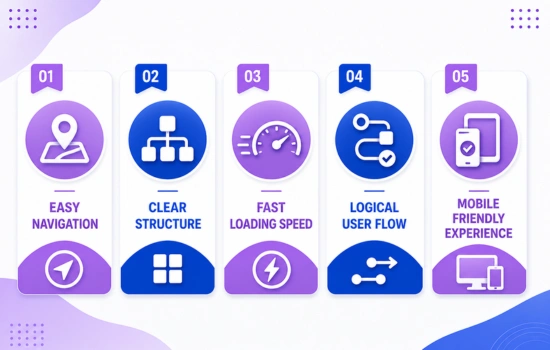
UX design is not just about how a website looks, but how it works. It involves planning the structure, organizing content, and creating a clear path for users to follow from the moment they land on your site.
A good UX design ensures that users do not feel lost or confused. Instead, they can navigate easily, find information quickly, and complete actions like filling a form or making a purchase without any difficulty.
Key Elements of UX Design
- Easy Navigation: Your website should be simple to explore. Menus, links, and buttons should be placed in a way that users can move from one page to another without confusion.
- Clear Structure: Content should be organized properly with headings and sections. This helps users understand information quickly and improves readability.
- Fast Loading Speed: A slow website can frustrate users and make them leave. Speed plays an important role in keeping visitors engaged.
- Logical User Flow: Users should follow a natural path from landing on the website to completing an action. Every step should feel connected and easy to follow.
- Mobile Friendly Experience: Since most users browse on mobile devices, your website should work smoothly on all screen sizes without affecting usability.
Why UX Design Matters
A well designed user experience helps visitors stay longer on your website and interact with your content. It reduces confusion and makes it easier for users to trust your business.
When users have a positive experience, they are more likely to take action, whether it is contacting you, signing up, or making a purchase.
UX design ensures that your website is easy to use, clear, and user focused. When the experience is smooth and hassle free, users stay engaged and your chances of converting them into customers increase significantly.Select 65 more words to run Humanizer.
What Is UI Design?
Many websites fail to engage users not because of poor functionality, but because they do not look appealing or professional. When the design feels outdated or cluttered, users often leave without exploring further.
UI, or User Interface design, focuses on the visual appearance of your website. It deals with how your site looks and how users interact with elements like buttons, images, and layouts, making the overall experience visually engaging.
Understanding UI Design
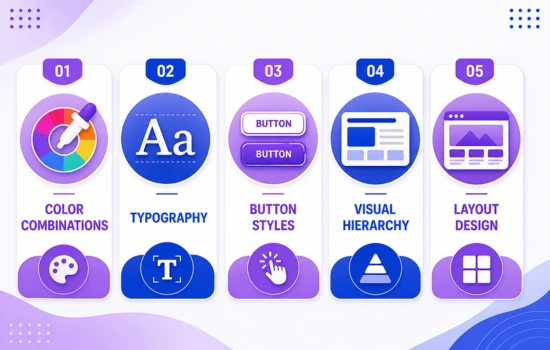
UI design is about creating an attractive and consistent look that reflects your brand. It includes selecting the right colors, fonts, and layouts to make your website visually pleasing and easy to interact with.
A well designed interface guides users visually, helping them understand where to click, what to read, and how to move through the website without confusion.
Key Elements of UI Design
- Color Combinations: Colors play a major role in creating visual appeal and brand identity. The right color scheme makes your website look professional and helps highlight important elements.
- Typography: Fonts should be clear, readable, and consistent. Good typography improves readability and makes your content easier to understand.
- Button Styles: Buttons should be clearly visible and easy to click. Their design should guide users toward important actions like contacting you or making a purchase.
- Visual Hierarchy: Important elements should stand out more than others. Proper use of size, color, and spacing helps users focus on key information.
- Layout Design: A clean and well structured layout ensures that content is presented in an organized way. It improves user flow and makes the website easier to navigate.
Why UI Design Matters
UI design creates the first impression when a user visits your website. A visually appealing design builds trust and encourages users to stay longer and explore your content.
When your interface is clean and professional, users feel more confident interacting with your website and are more likely to take action.
UI design is essential for creating a strong visual impact. A clean, attractive, and user friendly interface not only grabs attention but also keeps users engaged, increasing the chances of turning visitors into customers.
UX vs UI Design: Key Differences
Many people get confused between UX and UI because both are closely connected and often work together in the design process. This confusion can lead to focusing on only one aspect and ignoring the other.
Understanding the difference between UX and UI helps you build a website that not only looks good but also performs well. Each plays a unique role in creating a complete user experience.
| UX Design | UI Design |
| Focus on overall user experience | Focus on visual appearance |
| Improves usability and functionality | Enhances look and feel |
| Based on user research and behavior | Based on design creativity |
| Defines structure and user journey | Designs interface elements |
| Ensures smooth navigation | Creates attractive layouts |
Explanation in Simple Terms
- UX Design is about how your website works. It ensures users can easily navigate, find information, and complete actions without confusion.
- UI Design is about how your website looks. It focuses on colors, fonts, buttons, and layout to make the site visually appealing.
Both are important because a good looking website without usability will confuse users, and a usable website without design will fail to attract attention.
UX and UI are different but they work together to create a successful website. When both are properly balanced, your website becomes easy to use, visually appealing, and more effective in converting visitors into customers.
How UX and UI Work Together
Many websites fail because they focus only on looks or only on functionality. When one aspect is strong and the other is weak, users do not get a complete and satisfying experience.
To achieve the best results, UX and UI must work together. UX builds the structure and flow of the website, while UI adds the visual layer that makes the experience engaging and appealing.
Understanding Their Connection
UX and UI are not separate processes. They are part of the same design journey where one supports the other. UX starts by understanding user needs and planning how they will interact with the website.
Once the structure is ready, UI brings it to life by designing the interface. It adds colors, typography, and visual elements that guide users and make the experience more enjoyable.
- UX Plans Journey: UX design maps out the user journey from start to finish. It decides how users will navigate through the website and what steps they will take.
- UI Designs Interface: UI design focuses on how each page looks. It creates visually appealing layouts that align with the planned user journey.
- UX Ensures Usability: UX makes sure the website is easy to use. It removes confusion and ensures users can complete their tasks smoothly.
- UI Improves Appeal: UI enhances the overall look and feel of the website. It makes the interface attractive and encourages users to interact.
Why Balance Is Important
A website with strong UX but weak UI may work well but fail to impress users visually. On the other hand, a website with strong UI but poor UX may look good but confuse users.
Balancing both ensures that your website is not only functional but also visually engaging, creating a better overall experience.
When UX and UI work together, they create a complete and seamless user experience. This combination leads to higher engagement, better user satisfaction, and improved conversions, making your website more effective for business growth.
Why UX and UI Are Important for Your Website
Many websites fail not because the service is weak, but because users struggle to navigate or understand the interface. When visitors feel confused or frustrated, they leave quickly, which directly affects engagement and sales.
- Better User Experience: A well planned UX ensures users can easily find what they are looking for. It reduces confusion and makes the overall journey smooth and comfortable.
- Increased Engagement: When your website is easy to use and visually attractive, users spend more time exploring your content and interacting with different sections.
- Lower Bounce Rate: If users quickly leave your website, it indicates a poor experience. Good UX and UI keep visitors engaged, reducing the chances of them leaving immediately.
- Higher Conversion Rate: A clear layout and well placed design elements guide users toward taking action, such as filling out a form or making a purchase.
Strong Brand Impression: A clean and professional design builds trust and creates a positive impression of your business in the user’s mind.
Why It Matters for Business Growth
UX and UI are not just about design, they directly impact how your business performs online. A well designed website builds trust, improves usability, and increases the chances of turning visitors into customers.
When users have a positive experience, they are more likely to return and recommend your business to others.
UX and UI play a crucial role in the success of your website. A well designed site not only attracts users but also keeps them engaged and encourages them to take action, helping your business grow effectively.
UX vs UI Example
Many people understand definitions but still struggle to see how UX and UI work in real situations. Without a practical example, the difference can feel unclear.
A simple real world scenario makes it easier to understand. Let’s take an ecommerce website where users want to find a product and complete a purchase quickly.
Scenario: Online Shopping Experience
When a user visits an ecommerce website, they expect a smooth and hassle free journey. From browsing products to completing payment, every step should be simple and clear.
This is where both UX and UI play important roles. UX focuses on making the process easy, while UI makes the experience visually engaging.
- UX Ensures Easy Navigation: UX design organizes categories, menus, and filters so users can quickly find the product they are looking for without confusion.
- UI Makes Pages Attractive: UI design enhances product pages with clean layouts, appealing images, and well styled elements that catch the user’s attention.
- UX Simplifies Checkout: UX reduces unnecessary steps in the buying process. A simple checkout flow helps users complete their purchase quickly.
- UI Highlights Actions: UI uses buttons, colors, and visual cues to highlight important actions like “Add to Cart” or “Buy Now,” making them easy to notice and click.
Why This Matters
If UX is poor, users may struggle to find products or complete their purchase. If UI is weak, the website may look untrustworthy or unappealing.
Both need to work together to create a seamless and enjoyable shopping experience.
UX and UI are both essential for a successful website. UX improves functionality and user flow, while UI enhances visual appeal. Together, they create a smooth experience that keeps users engaged and increases the chances of conversion.
Common Mistakes in UX and UI Design
Many businesses invest in design but still fail to get results because of common mistakes that go unnoticed. These issues may seem small, but they can seriously affect how users interact with your website.
Understanding these mistakes helps you fix problems early and create a better experience for your visitors. A well optimized design keeps users engaged and improves overall performance.
- Complicated Navigation: When menus and links are confusing, users struggle to find what they need. This creates frustration and increases the chances of them leaving your website.
- Too Many Design Elements: Overloading your website with too many colors, images, or animations can make it look cluttered. This distracts users and reduces clarity.
- Slow Loading Pages: A slow website can quickly drive users away. Speed plays an important role in both user experience and overall website performance.
- Poor Mobile Experience: If your website does not work properly on mobile devices, you lose a large number of potential users. Mobile optimization is essential today.
- Lack of Clear Call to Action: If users do not know what to do next, they will leave without taking action. Clear buttons and instructions guide users toward conversions.
Why Avoiding These Matters
Even a small issue in design can create a negative experience for users. When users feel uncomfortable or confused, they are less likely to trust your website or take action.
Fixing these mistakes improves usability, keeps users engaged, and increases your chances of achieving better results.
Simple and user friendly design always performs better. By avoiding common UX and UI mistakes, you can create a smooth, clear, and engaging experience that keeps users on your website and encourages them to take action.
Which One Is More Important?
Many people try to choose between UX and UI, thinking one is more valuable than the other. This confusion often leads to focusing only on visuals or only on functionality, which creates an incomplete website experience.
In reality, both UX and UI play equally important roles in website success. A good website needs to work smoothly and look appealing at the same time to keep users engaged and encourage action.
Understanding the Balance
UX focuses on how users interact with your website, while UI focuses on how the website looks during that interaction. If either one is weak, the overall experience suffers.
A well balanced approach ensures that users not only find your website easy to use but also visually engaging, which increases trust and interaction.
- UX Without UI Looks Dull: Even if your website works perfectly, a poor visual design can make it feel outdated and untrustworthy, causing users to leave quickly.
- UI Without UX Feels Confusing: A visually attractive website without proper structure and usability can frustrate users, making it difficult for them to complete their tasks.
- Both Are Needed Together: UX and UI complement each other. One ensures smooth functionality, while the other enhances the visual experience, creating a complete and effective website.
Why Both Matter for Business
When UX and UI work together, they improve user satisfaction, increase engagement, and boost conversion rates. A balanced design approach helps your website perform better and supports business growth.
Ignoring either UX or UI can lead to lost opportunities, as users may leave your website without taking any action.
There is no real comparison between UX and UI because both are essential. A balanced combination of usability and design creates the best results, helping your website attract, engage, and convert users effectively.
Conclusion
If your website is not converting visitors into customers, the problem is often in the user experience and design. A confusing layout or poor interface can push users away even if your services are good.
By improving UX and UI, you can create a website that not only looks good but also performs well. If you want better results and a professional approach, it is always a smart choice to work with experts who understand both design and user behavior.If you are ready to improve your website performance, contact us for expert web design services and start creating a better user experience for your audience.