

Starting a website project without a clear plan can lead to missed deadlines, incomplete content and confusion about who needs to provide information or approve decisions. Even when the design looks simple, a website requires planning across its pages, functionality, content and technical requirements. Missing these details at the beginning can create extra work later in the project.
A website project checklist helps you organise these tasks before design and development begin. It gives you a clear view of what to prepare, which decisions need to be made and who is responsible for each task. Whether you are building a new business website or redesigning an existing one, having these details ready can help the project move forward with fewer delays.
What to Prepare Before Your Website Project Begins
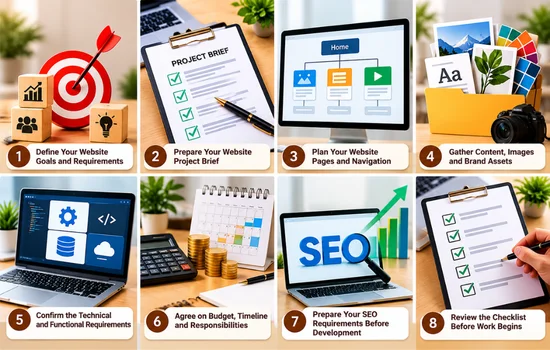
Before work begins, make sure you have the essential information, content and decisions ready for your web designer. The following 12 checkpoints will help you organise the project, clarify responsibilities and reduce avoidable delays during development.
1. Define Your Website Goals and Requirements
Before planning your website, be clear about what your business needs it to achieve. A website designed to generate enquiries will require a different approach from one built to accept bookings or sell products. Understanding the intended outcome helps you make better decisions throughout the project.
Use these questions to define your requirements:
Who is your target audience?
Identify the people you want to reach and the information they need before choosing your business.
What is the main business goal?
Decide whether you want visitors to request a quote, book a service, purchase products or contact your team.
What must the website allow visitors to do?
List essential functions, such as submitting an enquiry, booking an appointment or completing a purchase.
How will you measure success?
Choose relevant measures, such as qualified enquiries, completed bookings or online sales.
Write down your answers and share them with your web designer. This gives the project a clear direction and helps keep decisions focused on business priorities.
2. Prepare Your Website Project Brief
Website project brief gives your web designer a clear understanding of your business, expectations and project boundaries. It also helps them estimate the work, identify potential challenges and recommend an appropriate approach before development begins.
Include the following information in your brief:
- Business overview: Explain what your business does, which services or products you offer and who you want to reach.
- Reference websites: Share competitor websites or examples you like, explaining what appeals to you, such as navigation, layout or content presentation.
- Brand assets: Provide your logo, brand colours, fonts and any existing design guidelines.
- Budget and timeline: State your available budget, preferred launch date and any deadlines that affect the project.
- Project priorities: Identify the features you need at launch and those that can wait until a later phase.
3. Plan Your Website Pages and Navigation
Before designing individual pages, decide what information visitors need and how they will find it. A well-organised website helps people move from understanding your business to exploring your offerings and taking the next step.
Use this checklist to plan your main pages:
- Homepage: Introduce your business and direct visitors to important information.
- About page: Explain your background, experience and what customers should know about your business.
- Service or product pages: Give each main service or product enough space to explain its details and value.
- Contact or enquiry page: Make it easy for visitors to ask questions or request a quote.
- Supporting pages: Add FAQs, testimonials and relevant policies where they help visitors make informed decisions.
- Blog or resource section: Include this if you plan to publish useful articles regularly.
Next, group related pages together and plan how visitors will access them through your main menu and internal links. Give every page a clear purpose, rather than adding pages simply because competitors have them.
4. Gather Content, Images and Brand Assets
Prepare your website content and visual assets before the design process begins. Having these materials ready helps your designer plan layouts around the actual information rather than using temporary text and placeholder images that may need replacing later.
- Page content: Prepare draft or final text for each planned page, including service descriptions, headings and calls to action.
- Brand assets: Collect your logo files, brand colours, fonts and existing design guidelines.
- Images and examples: Gather original business photographs, product images, project examples or portfolio work that represents your business accurately.
- Trust information: Prepare team biographies, relevant qualifications, approved testimonials and other evidence that supports your credibility.
- Permissions and approvals: Confirm you have permission to publish photographs, customer reviews and other third-party materials.
Tip: Assign one person to supply and approve each type of content. Keep files organised in clearly named folders and track missing items so they do not hold up design reviews or final approval.
5. Confirm the Technical and Functional Requirements
Before development begins, identify the technical services and features your website will need. These decisions can affect the project scope, ongoing costs and the time required to build and maintain the site.
- Domain and ownership: Confirm who owns the domain name and has access to its registrar account.
- Hosting and platform: Discuss suitable hosting and website platform options with your web professional.
- Essential features: Identify requirements such as contact forms, appointment bookings or ecommerce functionality.
- Integrations: Check whether you need payment gateways, CRM software or other business tools connected to your website.
- Tracking: Plan for analytics and Google Search Console to measure website activity and monitor search performance.
- Security and access: Agree on backups, security measures, account permissions and who will manage updates.
You do not need to select every technical tool yourself. Focus on explaining what the website must do, then work with your web professional to choose suitable solutions.
6. Agree on Budget, Timeline and Responsibilities
Website project runs more smoothly when everyone understands what needs to be delivered, when tasks are due and who is responsible for decisions. Agree on these details with your web designer before work begins to reduce misunderstandings and unexpected delays.
- Project scope: Document the agreed deliverables and what falls outside the project.
- Budget and payments: Confirm the total cost, payment milestones and any potential additional charges.
- Timeline: Set realistic dates for key milestones, feedback and the planned launch.
- Task ownership: Decide who will provide content, supply materials and approve completed work.
- Revisions and sign-off: Agree on how feedback will be shared, how revisions will be handled and who gives final approval.
- Ongoing maintenance: Confirm who will manage updates, backups and technical support after launch.
Use a shared project tracker to record deadlines, outstanding tasks and decisions. This makes it easier for everyone to see what is pending and what needs attention next.
7. Prepare Your SEO Requirements Before Development
Planning SEO before development helps you build a website structure that supports search visibility from the beginning. Leaving these decisions until launch can lead to avoidable changes to page content, URLs and navigation.
- Keyword research: Identify the search terms potential customers use when looking for your services or products.
- Page targeting: Assign a primary topic and search intent to each important page to avoid unnecessary overlap.
- Page structure: Plan relevant page titles, headings and clear URLs.
- Internal linking: Identify related pages that should link to one another.
- Existing URLs: If redesigning a website, record current URLs and identify which need to be retained or redirected.
- Tracking tools: Plan Google Analytics and Google Search Console setup to measure activity and monitor search performance.
For an existing website, prepare and test necessary redirects before launch to help visitors and search engines reach the correct pages.
8. Review the Checklist Before Work Begins
Before giving your web designer the go-ahead, review the project details together to confirm that everyone is ready to proceed. This final check helps identify missing information or unclear decisions before they affect the schedule.
Use this readiness checklist:
- Website goals and project scope are approved.
- Required pages and navigation are agreed.
- Available content, images and brand assets are organised.
- Essential features and integrations are documented.
- Budget, milestones and responsibilities are confirmed.
- SEO requirements and existing URL changes are recorded.
- One person is responsible for final decisions and approvals.
When Should You Get Professional Help With a Website Project?
Professional guidance can be useful when your website requirements are unclear, you need complex integrations or you are unsure which features should be prioritised. For example, connecting booking software, payment systems or customer management tools may require additional planning to ensure everything works together correctly.
Web designer can help you organise your site structure, assess your technical requirements and identify which features are essential for launch. They can also help you plan the project around your budget, avoid unnecessary functionality and identify potential issues before development begins.
If you need support with these decisions, explore ourweb design services to discuss your requirements and determine the most practical approach for your business website.
Get Your Website Project Ready to Start
A well-planned website project starts with clear requirements, organised content and agreed responsibilities. Preparing your materials, confirming deadlines and addressing SEO before development begins can help reduce delays and avoid unnecessary changes later.
If you need help planning your website, speak with Revolution Hub to discuss your requirements, prioritise essential features and create a clear plan for your project.