

Have you ever visited a website and struggled to find the service, information or contact details you were looking for?
When pages are poorly organised, visitors can become confused, miss important information or leave without taking the next step. Even a well-designed website can be difficult to use if its content lacks a clear structure.
Website structure planning helps prevent this by organising pages into a logical hierarchy and making it easier for visitors to move between related sections. It involves deciding which pages your business needs, how they connect and where each page belongs. If you are planning a new website, professional web design services can help you build a structure that supports your business needs from the start.
What Is Website Structure Planning?
Website structure planning is the process of organising a website’s pages and deciding how they relate to one another. It creates a clear framework that helps visitors find information and understand how different sections fit together. For example, a service-based business might group individual service pages under one main services section instead of presenting every page separately.
Three elements work together to create this structure:
- Website hierarchy: Shows how pages are grouped, including parent pages and their subpages.
- Sitemap: Provides an overview of the pages a website contains and how they are organised.
- Navigation and internal links: Help visitors move between sections and discover related information within page content.
Planning these elements together helps businesses avoid disconnected pages, confusing relationships and gaps in important information before the website is built or updated.
Why Does Your Business Need a Clear Website Structure?
A clear website structure helps visitors reach the information they need without searching through unrelated pages. When services, pricing details, company information and contact options are organised logically, people can find relevant answers and decide what to do next.
It also helps search engines understand how your pages relate to one another. Grouping related services and supporting information makes these relationships easier to identify and helps search engines discover relevant pages across the website.
Planning the structure before development can also reveal content gaps and unnecessary pages. For example, you may discover that a key service needs its own page or that two planned pages cover the same subject. Identifying these issues early helps you focus resources on useful content and avoid avoidable changes later.
How to Plan a Website Structure Step by Step
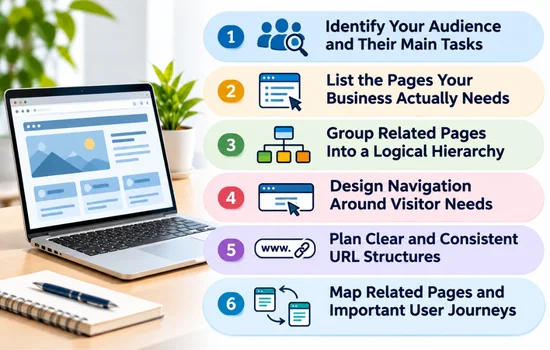
A well-organised website starts with a clear plan for its pages and how they connect. Follow these steps to build a logical structure that helps visitors find relevant information and makes future updates easier.
1. Identify Your Audience and Their Main Tasks
Before deciding which pages to create, consider what visitors will want to accomplish when they arrive at your website. Some may need to compare services, check pricing, review previous projects or find out how to request a quote. List the questions they are likely to ask and the actions they need to complete.
Use these tasks to determine what information deserves its own page. For example, if customers regularly want to see examples of your previous work, a dedicated portfolio page may help them assess your experience. This keeps the structure focused on what visitors need rather than what the business wants to say.
2. List the Pages Your Business Actually Needs
Create an initial list of pages based on your services, business model and the information customers need before making a decision. A typical small business website might include:
- Home: Introduces the business and directs visitors to key sections.
- About: Explains the company’s background and experience.
- Individual service pages: Describe each main service separately.
- Portfolio or case studies: Show completed projects and results.
- Blog or resources: Answer relevant questions and provide useful guidance.
- Contact or enquiry: Explains how visitors can get in touch.
- FAQs: Address common questions that are not fully answered elsewhere.
If a section has little useful information or duplicates another page, reconsider whether it needs to exist.
3. Group Related Pages Into a Logical Hierarchy
Once you have your page list, arrange related pages into groups with clear parent and child relationships. For example, a web design agency could place a main Services page above individual pages for Website Design and Ecommerce Website Design. This gives visitors a clear path from a general overview to the specific service they want to explore.
Avoid placing every page at the same level, as this can make the overall structure harder to understand. At the same time, do not create too many layers that force visitors to pass through several pages before reaching useful information. Aim for a hierarchy that reflects the relationship between your offerings and allows people to reach important content in a few straightforward steps.
4. Design Navigation Around Visitor Needs
Your navigation should help visitors reach the most useful sections without having to inspect every page. Include key destinations, such as Services, About and Contact, in the main navigation. Less frequently needed links can sit within relevant dropdowns or the footer, keeping the primary menu focused.
Choose labels that visitors will recognise immediately. For example, use “Our Services” rather than an internal department name that customers may not understand. Keep navigation items in predictable positions across the website so people can find them as they move between pages. Before finalising the menu, consider whether a first-time visitor could identify where to find a service, learn about your business or submit an enquiry without guessing.
5. Plan Clear and Consistent URL Structures
A URL should give visitors a clear idea of what a page contains and, where useful, show how it fits within the website. For example, a service page could use /services/website-design/, while another uses /services/seo/. This consistent pattern makes the relationship between the pages easy to recognise.
Keep URLs short, readable and relevant to the page. Avoid adding unnecessary folders, random characters or confusing parameters when they are not needed. If your website already has established URLs, do not change them without a clear reason. Unplanned changes can break existing links and require redirects to preserve access to the original pages.
6. Map Related Pages and Important User Journeys
Think about the route a visitor might take from their first visit to making an enquiry. For example, someone could arrive on the homepage, explore a service page, review a related case study and then visit the contact page. Mapping these journeys helps you identify which pages should connect and where visitors may need another useful step.
Plan links between pages when they support a clear relationship. A service page could link to a relevant project example, while a case study could direct interested readers to the service used. Avoid linking every page to every other page simply to create more connections. Instead, prioritise links that help visitors find supporting information, compare relevant options or move towards an appropriate next action.
Common Website Structure Mistakes to Avoid
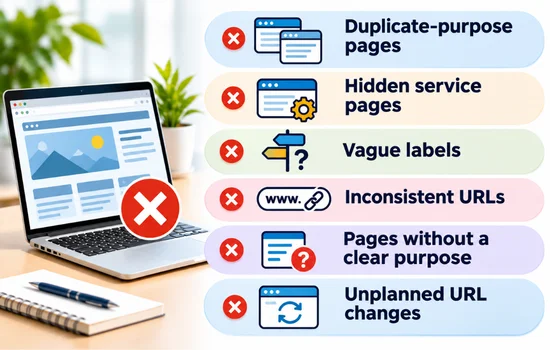
Even a carefully planned website can become difficult to use when its structure is poorly maintained. Watch out for these common mistakes:
- Duplicate-purpose pages: Multiple pages covering almost the same topic can confuse visitors about which one to use.
- Hidden service pages: Burying important offerings several levels deep makes them harder to discover.
- Vague labels: Terms such as “More” or “Solutions” may leave visitors unsure about what they will find.
- Inconsistent URLs: Different naming patterns make page addresses less predictable and harder to interpret.
- Pages without a clear purpose: Unnecessary content adds clutter without helping a specific audience.
- Unplanned URL changes: Changing established addresses without reviewing redirects and existing links can lead to broken links and lost access to useful pages.
Review these issues before launch and whenever your website grows.
Website Structure Example for a Small Business
A small web design agency could organise its website with a simple hierarchy that helps visitors move from general information to specific services.
- Home
- About
- Services
- Website Design
- Ecommerce Website Design
- SEO Services
- Case Studies
- Contact
The main Services page introduces the agency’s offerings, while each individual service page explains a specific solution in more detail. Case studies provide examples of completed work, and the Contact page gives interested visitors a clear way to enquire.
This is a starting point, not a fixed template. A business with fewer services may need fewer pages, while one offering several distinct services may benefit from a more detailed structure. Let customer needs guide the final hierarchy.
How to Review Your Website Structure Before Launch
Before publishing your website, check that every page serves a clear purpose and related pages sit in logical groups. Make sure visitors can reach key services easily, URL patterns remain consistent, and important journeys lead to a useful next step without unnecessary dead ends.
Test these paths as if you were a first-time visitor, from finding a service to submitting an enquiry. Fixing structural issues before launch can prevent broken journeys and reduce the need for costly changes later.
Build a Structure That Can Grow With Your Business
A well-planned website structure helps visitors find the information they need and understand how your services relate to one another. Clear page hierarchies, descriptive URLs, useful navigation and relevant links create a better experience while making it easier to manage your website as your business develops.
Review your website structure whenever you introduce new services, publish content or change customer needs. If you are planning a new website or improving an existing one, explore Revolution Hub’s web design services for support in creating a website that fits your business needs.