
Here’s a mistake we see all the time: a business owner picks an eCommerce platform in an afternoon, then spends the next year fighting it. Fees they didn’t expect. Features they can’t add. A site that crashes on the one day sales finally take off. And eventually, a costly rebuild on a different platform.
The platform you choose isn’t just a tech decision. It decides how much you’ll spend every month, how fast you can grow, and how many late nights you’ll lose to website problems.
That’s why the Shopify vs WooCommerce question matters so much. Both power millions of online stores, and both work well. But they’re built for very different kinds of business owners. In this guide, we’ll compare them side by side in plain language, so by the end you’ll know exactly which one fits your business, your budget, and how hands-on you want to be.
Short on Time? Here’s the Verdict
Choose Shopify if you want a store that is quick to launch and easy to run, with hosting, security and updates handled for you.
Choose WooCommerce if you already use WordPress, want full control over every detail, and don’t mind managing the technical side (or paying someone to do it).
Here is how they stack up at a glance:
| Factor | Shopify | WooCommerce |
|---|---|---|
| Type | All-in-one hosted platform | Free plugin for WordPress |
| Setup time | A few hours to a few days | A few days to a few weeks |
| Starting cost | About $39 per month | About $15–$50 per month (hosting + extras) |
| Tech skills needed | Low | Medium |
| Hosting and security | Included | You manage it |
| Customization | Good, within limits | Almost unlimited |
| Best for | Beginners and fast-growing brands | WordPress users and content-led brands |
What Is Shopify?
Shopify is a hosted eCommerce platform. You pay a monthly fee, and you get everything in one place: hosting, a store builder, checkout, security, and a dashboard for orders and stock.
Think of it like renting a fully furnished shop in a busy mall. You can decorate it the way you like, but the building, the locks and the repairs are someone else’s job. Brands like Gymshark and Allbirds run on Shopify, along with millions of small sellers.
What Is WooCommerce?
WooCommerce is a free, open-source plugin that turns a WordPress website into an online store. If Shopify is a rented shop, WooCommerce is owning the building. You decide the layout and every rule, but you also handle the electricity, repairs and security.
Because it runs on WordPress, it’s a natural pick if you already have a WordPress site or blog. If you’re still weighing up other options too, our guide on how to choose the right website platform for your business covers the bigger picture.
Shopify vs WooCommerce: Head-to-Head Comparison
1. Ease of Setup and Use
With Shopify, you sign up, pick a theme, add products and connect payments. No coding, no servers. Many people launch a basic store in a weekend.
WooCommerce needs a few more steps. You buy a domain and hosting, install WordPress, add the WooCommerce plugin, pick a theme, then set up payments, shipping and taxes. The setup wizard helps, but there are more moving parts to manage.
Winner: Shopify, especially for first-time sellers.
2. Pricing: What You Will Really Pay
Shopify’s main plans start at about $39 per month (Basic), around $105 (Grow) and around $399 (Advanced), with roughly 25% off if you pay yearly. On top of that, most stores add a few paid apps at $5–$50 per month each, and you may buy a premium theme for a one-time $150–$400.
The WooCommerce plugin itself is free, but running a store isn’t. You’ll pay for hosting ($10–$50 per month for a good host), a domain (about $15 a year), possibly a premium theme ($50–$100), and paid extensions, which often cost $50–$300 a year each.
Here’s the honest truth: a simple WooCommerce store is often cheaper than Shopify. A feature-heavy one can cost the same or more once you add developer time. Before you decide, list your must-have features and add up the real monthly cost, not just the starting price.
Winner: A tie. It depends on what your store needs.
3. Design and Customization
Shopify’s theme store offers free and paid themes that look polished and work well on mobile. The drag-and-drop editor makes small changes easy. Bigger changes, though, need knowledge of Shopify’s own code language, Liquid.
WooCommerce works with thousands of WordPress themes and page builders like Elementor. With a developer, you can change almost anything, from the product page layout to the way checkout works. If you want a store that looks truly unique, professional eCommerce web design on WooCommerce gives you the most room to make it happen.
Winner: WooCommerce for freedom, Shopify for speed and simplicity.
4. Payments and Transaction Fees
Shopify has its own built-in system, Shopify Payments. If you use it, there’s no extra platform fee. But if you use a third-party gateway like PayPal or Razorpay as your main processor, Shopify charges an extra fee on every sale (2% on the Basic plan, less on higher plans). Shopify Payments also isn’t available in every country, so check this before you sign up.
WooCommerce charges no platform fee at all. It supports Stripe, PayPal, Square, Razorpay and many local gateways, and you only pay what the gateway itself charges.
Winner: WooCommerce, for lower fees and more choice.
5. SEO and Marketing
Both platforms can rank well on Google. Shopify covers the basics: editable page titles and meta descriptions, clean URLs, automatic sitemaps and fast hosting. Its limits show up in the details. For example, URLs always include fixed parts like /products/ and /collections/, and you can’t change that.
WooCommerce, built on WordPress, gives you full control. Plugins like Yoast or Rank Math let you fine-tune every page, and WordPress is still the best blogging tool around. If content marketing is a big part of your plan, that’s a real advantage. Pair it with expert SEO services and you have a strong base for organic growth.
On the marketing side, Shopify shines. You can sell on Instagram, Facebook, Google and TikTok, and send emails, all from one dashboard.
Winner: WooCommerce for SEO control, Shopify for built-in sales channels.
6. Security and Maintenance
Shopify takes care of SSL certificates, payment security (PCI compliance), server protection and updates. You never have to think about it.
With WooCommerce, that job is yours. You need to update WordPress, your theme and your plugins, run backups and add security tools. Outdated plugins are one of the most common ways sites get hacked. Good managed hosting or a regular maintenance plan takes most of this off your plate.
Winner: Shopify.
7. Growth and Scalability
Shopify handles sudden traffic spikes, like a festive sale or a viral post, without you upgrading anything. Larger brands can move up to Shopify Plus.
WooCommerce can run very large stores too, but as you grow you’ll need stronger hosting, caching and developer help to keep things fast.
Winner: Shopify, for hassle-free growth.
8. Customer Support
Shopify offers 24/7 support by chat and email. WooCommerce has no single helpline. Help comes from its documentation, community forums, your hosting company and individual plugin developers.
Winner: Shopify.
When Shopify Is the Better Choice

- You’re new to selling online and want to launch quickly
- You don’t have a developer and don’t want to deal with tech
- You expect fast growth or big traffic spikes
- You want to sell on social media and marketplaces from one place
- You prefer one predictable monthly bill
For example, a clothing brand that runs Instagram ads and launches new collections every month will usually do better on Shopify.
When WooCommerce Is the Better Choice
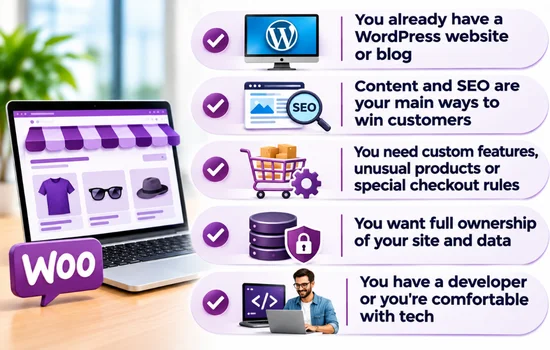
- You already have a WordPress website or blog
- Content and SEO are your main ways to win customers
- You need custom features, unusual products or special checkout rules
- You want full ownership of your site and data
- You have a developer or you’re comfortable with tech
For example, a food blogger selling recipe e-books and kitchen tools to a loyal audience would fit WooCommerce well.
Can You Switch Platforms Later?
Yes. You can move from WooCommerce to Shopify or the other way around using migration tools like Cart2Cart or LitExtension, or by exporting CSV files. Products, customers and orders usually move without much trouble.
The tricky parts are design, apps and SEO. Your theme won’t come with you, and if your URLs change, you’ll need 301 redirects so you don’t lose your Google rankings. That’s why it pays to choose well from the start, or to get expert help if you do need to move.
Final Verdict
There’s no single winner in the Shopify vs WooCommerce debate. Shopify wins on convenience, speed and peace of mind. WooCommerce wins on control, flexibility and lower platform fees.
To decide, ask yourself three simple questions:
- How much time do I want to spend on the technical side?
- Do I already use WordPress?
- How important will content and SEO be to my growth?
Your answers will point you to the right platform. Still unsure? Talk to the Revolution Hub team and we’ll help you choose the platform that fits your business, not just the one that’s popular.
Frequently Asked Questions
Is Shopify better than WooCommerce for beginners?
Yes, in most cases. Shopify needs no coding, includes hosting and security, and offers 24/7 support, so beginners can launch faster with fewer problems.
Is WooCommerce really free?
The plugin is free, but running a store is not. You still pay for hosting, a domain, and often premium themes or extensions.
Which is better for SEO, Shopify or WooCommerce?
Both can rank well. WooCommerce gives you more control over URLs, content and technical settings, which helps content-heavy sites. Shopify covers the essentials and is easier to manage.
Which platform is cheaper for a small business?
A basic WooCommerce store usually costs less each month. But once you add paid extensions and developer time, the total can match Shopify. Compare the full cost, not just the starting price.
Can I use Shopify with my WordPress site?
Yes. Shopify’s Buy Button lets you add products and a checkout to an existing WordPress site, though it offers fewer features than a full Shopify or WooCommerce store.