

Have you ever left a website because it took too long to load?
Your visitors may do the same. When pages load slowly, people can lose patience, struggle to find the information they need or decide to look elsewhere. For a business, this can mean missed opportunities to connect with potential customers.
Website speed and user experience are closely connected. Website should not only look professional but also load quickly and respond smoothly when visitors browse pages, explore services or complete an enquiry form. Professional web design services can help address performance issues as part of creating a website that works well for both visitors and your business.
What Does Website Speed Mean?
Website speed refers to how quickly a web page loads and how soon visitors can use its features. A page might display its heading and background within seconds, while images, menus or interactive elements are still loading. For visitors, the experience is not complete until they can find information and use the features they need.
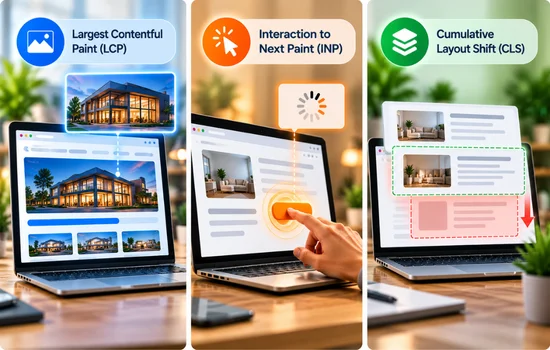
Google uses Core Web Vitals to assess important aspects of page experience. These measurements look at how quickly the main content appears, how promptly a page responds to user actions and whether elements move unexpectedly while loading. Together, they help website owners understand performance from a visitor’s perspective.
Loading times can also vary between devices and internet connections. Page that works smoothly on a desktop with a fast connection may take longer on a mobile phone or a weaker network. The page’s design, image sizes, hosting and other technical factors can all affect performance. This is why website speed should be considered across different devices, not just from one successful test.
How Website Speed Affects User Experience
Website speed influences how easily visitors can browse a site and interact with its content. When pages take too long to respond, even a well-designed website can become difficult to use.
- Finding Information: Visitors may have to wait for service details, pricing information or contact pages to appear, making it harder to find what they need.
- Slow Interactions: When interactive elements take time to work, visitors may click repeatedly or struggle to move between sections.
- Shifting Elements: If images, text or buttons shift while loading, visitors may lose their place or accidentally select the wrong option.
- Interrupted Browsing: Slow transitions can make it harder to compare services, read supporting information or return to a previous page.
- Mobile Usability: Visitors using smaller screens or slower connections may find it harder to use menus, read content and interact with page elements.
Clear navigation and stable page layouts also make the browsing experience easier to follow, allowing visitors to focus on the information they came to find.
How Slow Loading Times Can Affect Website Conversions
Website speed can influence whether a visitor takes the next step or leaves without contacting your business. Even when your services meet their needs, delays can interrupt their journey and make it easier to choose another provider.
- Potential customers may leave before reading important service details if a page takes too long to load.
- Slow service pages can delay visitors as they move towards a contact form or quote request.
- If a form loads slowly or responds late, visitors may give up before submitting their details, calling or booking a consultation.
- Website that performs poorly can make a business appear less reliable, particularly when visitors are comparing several providers.
- Fast loading alone cannot guarantee more enquiries. Clear service information, visible calls to action, trust signals and easy-to-use forms also influence decisions.
Improving website performance can remove some of these obstacles, helping visitors access information and complete actions more easily.
Why Mobile Website Speed Deserves Attention
Page that works well on a desktop may need improvements to perform equally well on mobile.
A few mobile-specific issues to watch for include:
- Large Images: Unoptimised images can use more data and take longer to display on mobile connections.
- Slow Menus: Navigation should open promptly and make important pages easy to reach on a smaller screen.
- Difficult Forms: Input fields should be easy to tap, complete and submit without unnecessary steps.
- Hidden Contact Options: Phone numbers, contact buttons and enquiry forms should be easy to find without excessive scrolling.
Test your homepage and key service pages on actual mobile devices, rather than relying only on desktop previews. This helps reveal practical issues that may not be obvious during desktop testing.
Common Reasons a Business Website Loads Slowly
Slow website can have several underlying causes, and identifying the source helps you choose the right fix. Common issues include:
- High-resolution images that have not been resized or compressed can increase the amount of data a page needs to load.
- Too many plugins, tracking tools or external scripts can add processing work and delay page interactions.
- Without suitable caching, a website may need to reload resources or generate pages repeatedly instead of reusing available data.
- Slow server responses or limited hosting resources can delay the delivery of page content.
- Excessive animations, video backgrounds and decorative effects can increase loading demands, especially on mobile devices.
- Unnecessary code or poorly built website components may affect how quickly pages load and respond.
Before removing plugins, changing hosting or redesigning a page, test its performance to identify which factors are actually causing delays.
How to Check Your Website Speed
Google PageSpeed Insights is a free tool that helps you assess how your website performs and identify areas that may need attention. Enter a page URL to view its performance results and recommendations for improvement.
The report includes two types of data. Field data reflects how real visitors have experienced a page, when sufficient data is available. Lab data comes from a controlled test environment, making it useful for identifying and diagnosing potential issues.
Three key measurements in the report are:
- Largest Contentful Paint (LCP): Measures how quickly the main content appears.
- Interaction to Next Paint (INP): Measures how promptly a page responds to user interactions.
- Cumulative Layout Shift (CLS): Measures unexpected movement of page elements.
Practical Ways to Improve Website Speed

Improving website speed does not always require a complete redesign. Start with changes that address the main performance issues and make pages easier to use.
Optimise Images
Resize images to fit their display areas and compress them without noticeable quality loss. Formats such as WebP or AVIF can reduce file sizes, helping pages load with less data.
Reduce Unnecessary Scripts and Plugins
Review installed plugins, tracking tools and external scripts. Remove anything your website no longer needs, but check that important features still work before disabling a tool.
Improve Caching and Hosting
Caching allows browsers or servers to reuse stored resources instead of processing or downloading everything again. If your website continues to respond slowly, review your hosting resources and server performance.
Simplify Page Layouts
Limit unnecessary animations, video backgrounds and decorative effects. Keep layouts focused on useful content so visitors can find information without extra visual distractions.
Test After Making Changes
Run another speed test after each major update and compare the results. Check your contact forms, navigation menus, phone links and other important features to ensure they still work correctly.
Regular testing helps identify issues and ensures your website continues to perform well as it grows.
Conclusion
Website speed plays an important role in how visitors experience your business online. By testing key pages, identifying performance issues and prioritising the right improvements, you can make your website easier to use and help visitors complete important actions.
If your website is slow or difficult to use, Revolution Hub can help you identify areas for improvement and build a website that supports your business goals. Contact us to discuss your website’s needs.