

Customer finds your store, picks out a few products and adds them to the cart. Then they close the tab and never come back.
If you run an online store, this happens all the time. Studies by the Baymard Institute show that about 70% of online carts are left without a purchase. So out of every 10 people who add something to their cart, only around 3 go on to pay.
That is a lot of lost sales. But most of the reasons people leave are simple to fix. Below, we explain why shoppers leave their carts, 10 changes you can make to your store, and how to check if those changes are working.
What Is Cart Abandonment?
Cart abandonment means a shopper adds items to their cart but leaves your website without buying.
Your cart abandonment rate shows how often this happens. Here is how to work it out:
Cart abandonment rate = (1 − orders completed ÷ carts created) × 100
Example: 200 people added items to their cart last month, and 60 of them placed an order. 60 ÷ 200 = 0.3. Then 1 − 0.3 = 0.7, so your rate is 70%.
Not every lost cart is a lost sale. Some people add items just to save them for later or to check the total price. You will never get the rate down to zero, and you don’t need to. The aim is to win back the people who wanted to buy but got stuck or put off.
Why Do Shoppers Leave Their Carts?
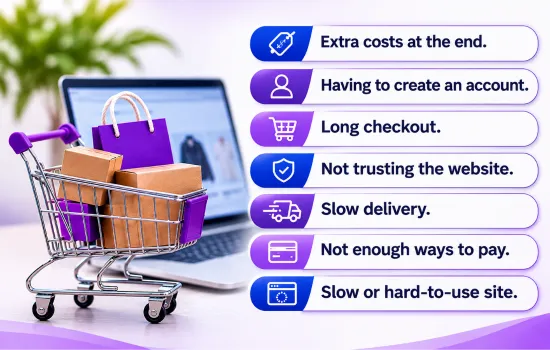
When shoppers are asked why they left, the same reasons come up again and again:
- Extra costs at the end. Shipping, fees or tax show up only at the last step. This is the most common reason.
- Having to create an account. Many people just want to buy and go.
- Long checkout. Too many pages and too many boxes to fill in.
- Not trusting the website. The site doesn’t look safe enough to enter card details.
- Slow delivery. Shipping takes too long, or the delivery time isn’t shown.
- Not enough ways to pay. The shopper’s favourite payment method isn’t there.
- Slow or hard-to-use site. Pages take too long to load or don’t work well on a phone.
Most of these come down to two things: checkout is too hard, or the shopper isn’t sure they can trust you. The 10 fixes below deal with both.
10 Ways to Reduce Cart Abandonment
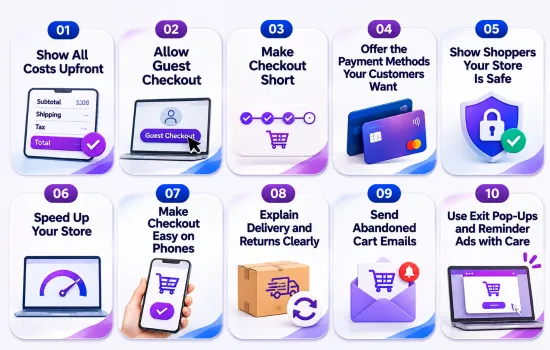
1. Show All Costs Upfront
No one likes finding extra costs at the last step. Show shipping prices on your product pages or in the cart, and say clearly if your prices include GST. A small shipping calculator in the cart helps people see the full price early.
You can also offer free shipping over a set amount, like “Free shipping on orders over $100.” Shoppers like it, and many will add another item to reach the limit.
2. Allow Guest Checkout
Asking people to create an account before they can pay is one of the fastest ways to lose a sale. Let shoppers check out as a guest, and make that button easy to find.
You can still ask them to create an account after they pay. By then you already have their name, email and address, so all they need to add is a password.
3. Make Checkout Short
Every extra box a customer has to fill in is one more chance for them to give up. Only ask for the details you need to take payment and send the order. Some quick changes that help:
- Turn on address lookup, so customers start typing and pick their address from a list
- Show a progress bar, like “Step 2 of 3”, so people know how much is left
- Add a “Billing address same as delivery” tick box
- Hide your main menu on checkout pages so nothing pulls people away
4. Offer the Payment Methods Your Customers Want
If shoppers can’t pay the way they like, they will buy from someone else. As well as Visa and Mastercard, think about adding Apple Pay, Google Pay and PayPal.
Buy now, pay later services like Afterpay and Laybuy are also popular in New Zealand, mostly for bigger purchases. Show these payment logos on your product pages, so shoppers know their option is there before they reach checkout.
5. Show Shoppers Your Store Is Safe
People will only enter their card details if they feel safe. A few simple things make your store look trustworthy:
- Install an SSL certificate, so a padlock shows next to your web address
- Show customer reviews and star ratings close to the “Add to cart” button
- List your phone number, email and business address where people can find them
- Add security and payment badges on the checkout page
When a shopper sees real reviews and a real phone number, they feel much better about paying.
6. Speed Up Your Store
People don’t wait for slow websites. If your cart or checkout pages take too long to load, many shoppers will leave before they pay. Make your images smaller, remove apps or plugins you don’t use, and pick a good hosting company. Our guide on how to speed up your website explains each step in plain terms.
7. Make Checkout Easy on Phones
Most people now shop on their phones, and they leave carts more often than people on computers. Small buttons, long forms and pop-ups that fill the whole screen all make mobile shoppers give up.
Try buying something from your own store on your phone. Could you do it with one hand in under a minute? If not, something needs to change. Good eCommerce web design plans the whole store around how people really shop, including on small screens.
8. Explain Delivery and Returns Clearly
Before paying, most shoppers want to know when their order will arrive and what happens if they need to send it back. Show delivery times on product pages and in the cart, for example “Arrives in 2–4 working days.”
Add a short note about returns near the buy button too. Something like “Free returns within 30 days” can be enough to help an unsure shopper decide to buy.
9. Send Abandoned Cart Emails
Even with a great checkout, some people will still leave. An abandoned cart email reminds them about what they left behind. Most stores do well with three emails:
- Email 1 (about 1 hour later): A quick reminder with a picture of the item in their cart.
- Email 2 (about 24 hours later): Help them decide by sharing reviews, delivery times or your returns policy.
- Email 3 (2 to 3 days later): If it suits your prices, offer something small like free shipping or 10% off.
Keep each email short. Add one clear button that takes them straight back to their cart.
10. Use Exit Pop-Ups and Reminder Ads with Care
An exit pop-up is a small box that shows up when someone is about to leave your website. You can use it to answer a common question or give a small offer. Show it only once, and make sure it’s easy to close.
Reminder ads, also called retargeting ads, show people the products they looked at while they browse Facebook, Instagram or Google. They work, but don’t overdo it. Seeing the same ad every few minutes annoys people.
How to Check If Your Changes Are Working
Before you change anything, write down your current cart abandonment rate. Then make one change at a time. That way you can see which changes actually help.
Most store platforms make this easy. Shopify has an abandoned checkouts report built in, and WooCommerce can track abandoned carts with a plugin. Still deciding which platform to use? Our Shopify vs WooCommerce comparison can help you choose.
It’s also worth setting up Google Analytics 4. Its funnel report shows which checkout step loses the most shoppers, so you know what to fix first.
Where Should You Start?
You can’t stop every shopper from leaving. But if you win back even a few of them each week, that adds up to real money, and you don’t have to spend more on ads to get it.
Start with the fixes that matter most: show all costs early, allow guest checkout, and keep checkout short. Then set up abandoned cart emails to catch the people who still leave. If you want help making your online store easier to buy from, talk to the Revolution Hub team.
Frequently Asked Questions
What is a good cart abandonment rate?
The average is about 70%, so if your rate is lower than that, you’re doing well. Many stores sit between 55% and 65%. The best goal is to keep lowering your own rate over time.
Do abandoned cart emails really work?
Yes. They go to people who were already interested enough to add something to their cart, so they are one of the easiest ways to win back sales.
Should I always offer a discount in my cart emails?
No. If every reminder comes with a discount, some customers will start leaving their carts on purpose just to get one. Send a normal reminder first and keep any discount for the last email.
What is the difference between cart abandonment and checkout abandonment?
Cart abandonment is when someone adds an item but never starts checkout. Checkout abandonment is when someone starts checkout but leaves before paying. It’s worth tracking both.